
A diver in Bali surfaced after a 32-minute dive to 28 metres. His rental computer had been set to air mode. He had breathed EAN32 all morning. The screen showed 4 minutes of NDL remaining — a number that felt generous. He went back down for a second dive on the same mix. By the end of the day his tissues carried far more nitrogen than the computer's algorithm assumed. That evening he developed joint pain and fatigue. The computer had not failed. It had been configured wrong from the first giant stride.
A dive computer is the single most important piece of safety equipment most recreational divers own — or rent. It replaces paper tables with a continuous calculation of tissue nitrogen loading, tracks your ascent rate in real time, and prompts safety stops. But it only protects you when you understand what it is showing, what it assumes, and what it cannot do. This guide covers the numbers that matter, the physics behind them, and the pre-dive ritual that keeps the device on your side.
What a Dive Computer Actually Calculates
At its core, every recreational dive computer runs a decompression model — a set of mathematical compartments that simulate how fast nitrogen dissolves into your tissues on descent (ongassing) and leaves them on ascent (offgassing). The output you see most often is the No-Decompression Limit (NDL): the maximum time you can stay at your current depth without requiring mandatory decompression stops.
The model is governed by Henry's Law: the amount of gas that dissolves into a liquid is proportional to the partial pressure of that gas. Deeper water means higher ambient pressure, higher partial pressure of nitrogen, and faster ongassing. Shallower water reverses the process. Your computer recalculates NDL every few seconds as depth changes.
What the computer does not do:
- It does not measure nitrogen in your blood — it estimates based on depth, time, and a theoretical model
- It does not account for individual physiology, dehydration, cold, or exertion that can raise DCS risk above what the model predicts
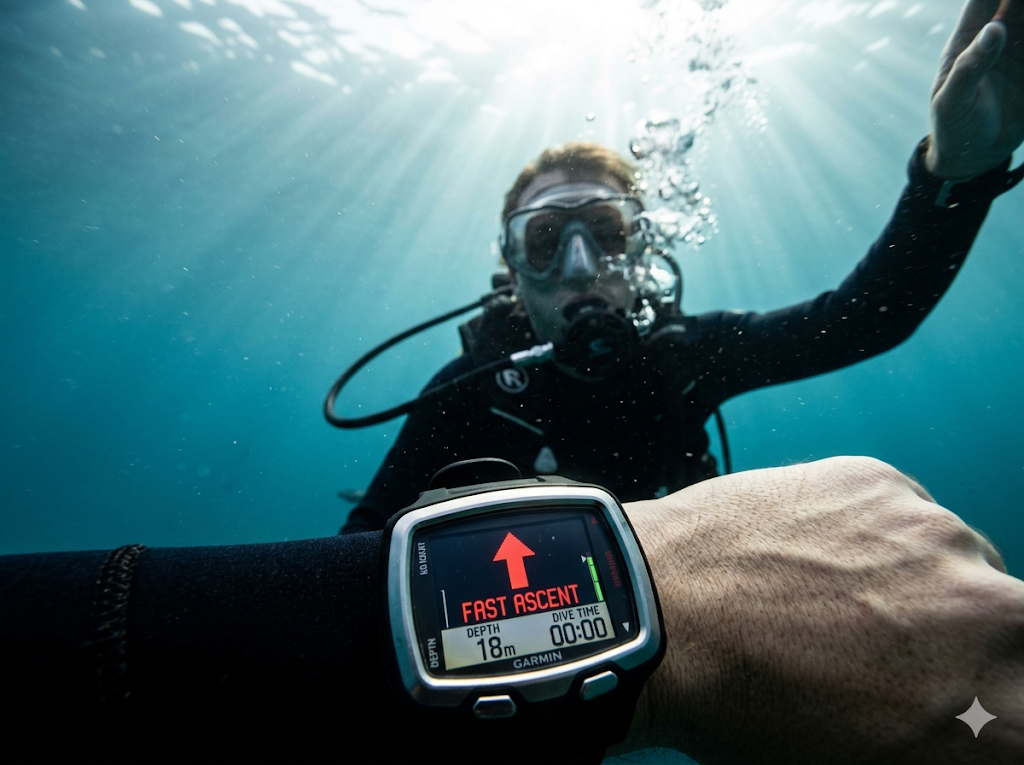
- It does not forgive a fast ascent — that is a separate alarm entirely
Key display fields — what they mean
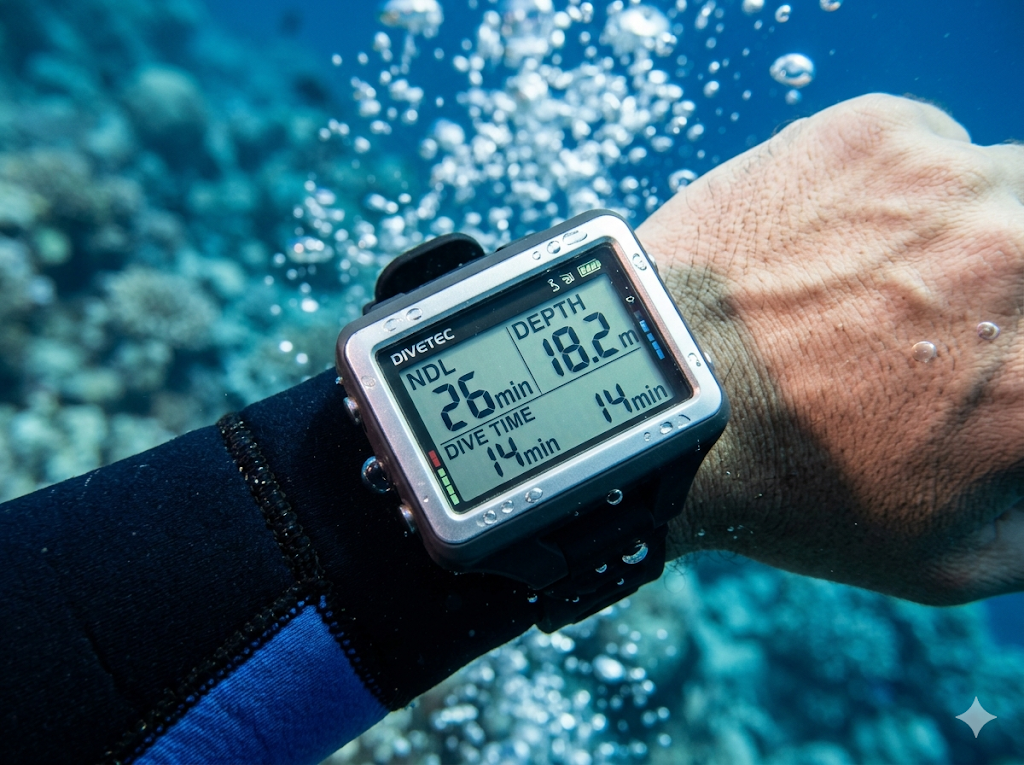
NDL: Reading the Number and Adding Your Own Margin
The NDL countdown tells you how much longer you can stay at your current depth before the model says you need decompression stops. It is not a target — it is a ceiling. Experienced divers plan their turn-around well before NDL hits zero, typically leaving 5–10 minutes of buffer for ascent time and the safety stop.
Multi-level dives change NDL continuously. Ascending from 30 m to 18 m extends your remaining time because ambient pressure drops and offgassing begins. A computer handles this automatically; paper tables require you to track each depth segment manually — one reason computers have largely replaced tables in recreational diving.
Repetitive dives load nitrogen from earlier dives into the model. After your first dive, the computer enters surface interval mode, offgassing you on the boat between dives. A short surface interval or a deep first dive can leave so little NDL on dive two that the second dive must be shallower or shorter. Ignoring the residual nitrogen warning is a common cause of DCS on holiday trips with three or four dives a day.
Pro tip — personal conservatism
Most computers offer a conservatism setting (sometimes called "personal adjustment" or "GF low/high" on technical models). Setting +1 or +2 conservatism shortens displayed NDL and extends required safety stops — trading bottom time for a larger nitrogen margin. On repetitive multi-dive days in warm water, this is cheap insurance.
Ascent Rate Alarms: Why 9–10 m/min Matters
Boyle's Law governs what happens when you rise: gas volume in your lungs, BCD, and tissues expands as ambient pressure drops. A fast ascent lets dissolved nitrogen come out of solution too quickly — forming bubbles — while simultaneously risking lung overexpansion. PADI, SSI, and DAN all teach a maximum ascent rate of 9–10 metres per minute for recreational diving.
Your computer measures ascent rate continuously and triggers an audible/visual alarm when you exceed the threshold — typically 10 m/min, though some models default to 12 m/min and should be tightened. The alarm is not a suggestion. When it sounds, stop ascending, vent your BCD if needed, and rise again only when the rate indicator drops into the green.
Common causes of fast ascents:
- Underweighted diver with an over-inflated BCD at the end of the dive
- Chasing a buddy or DM who is ascending too fast
- Positive buoyancy from an empty aluminium cylinder combined with a compressing wetsuit near the surface
- Panic or low-air rush to the surface
Safety Stops on the Computer
A safety stop is a voluntary (but strongly recommended) 3-minute pause at 5 metres at the end of a no-decompression dive. It is not the same as a mandatory decompression stop — confusing the two has sent divers to the surface early when the computer demanded a deeper ceiling.
Most recreational computers automatically prompt a safety stop when the dive profile warrants it — typically after dives deeper than 10 m or longer than a threshold time. The display shows a countdown timer and a depth band (usually 3–6 m). Hold depth until the timer reaches zero, then complete your final ascent to the surface slowly.
If you miss or shorten the safety stop because of low air, rough surface, or boat traffic, note it in your log. Repeated skipped stops on repetitive days compound decompression stress even when every individual dive was within NDL.
Nitrox Settings: FO₂, MOD, and the Rental Trap
If you dive enriched air, your computer must know the fraction of oxygen (FO₂) in your mix. Enter the analysed percentage — not the label on the cylinder. EAN32 analysed at 31.6% should be entered as 31.6%, not 32.
With FO₂ set correctly, the computer:
- Calculates extended NDL based on reduced nitrogen fraction
- Displays Maximum Operating Depth (MOD) for your mix
- Alarms if ppO₂ exceeds your set limit (typically 1.4 bar recreational working limit)
The rental trap: you analyse the cylinder, confirm EAN32, then strap on a rental computer still set to air (21%). The screen shows air NDL — shorter than reality — and gives no MOD warning. You are diving a rich mix with a computer that thinks you are on air. Always set FO₂ before the first dive of the day, and re-check after any surface interval long enough for the computer to auto-reset.
Rental vs. Own Computer: What Changes
| Factor | Rental computer | Own computer | |---|---|---| | Gas setting | Must verify FO₂ every dive | You control defaults | | Battery | Unknown charge — check before splash | Replace/charge on schedule | | Algorithm | Unfamiliar model possible | You learn your model's behaviour | | Dive log | May not transfer to your logbook | Full history for repetitive planning | | Conservatism | Factory default — often least conservative | Set to your preference |
If you rent, arrive early enough to set gas, conservatism, and alarms before the boat leaves. Ask the shop for a quick orientation if the model is unfamiliar — button sequences differ, but the safety logic does not.
Pre-Dive Computer Checklist
Run this before every dive — own or rental:
Pre-dive computer protocol
How ScubaProof Rates Computer Practices at Dive Centres
Computer literacy at a dive centre reflects broader safety culture. ScubaProof's Gear metric captures whether rental computers are maintained and correctly configured; Staff Conduct covers whether briefings include computer settings for nitrox dives; Safety and the composite Trust Score reflect patterns across reported experiences.
ScubaProof red flags — critical
- 🚩Nitrox issued with rental computers left on air mode — no FO₂ check offered
- 🚩Staff set your computer for you without showing the FO₂ and MOD on screen
- 🚩Rental computers with dead batteries or cracked screens still issued to guests
- 🚩Briefing tells divers to "ignore the computer and follow the DM" on NDL decisions
ScubaProof yellow flags — caution
- ⚠Only one computer model manual available — no orientation for unfamiliar brands
- ⚠Computers reset to least-conservative setting between divers without explanation
- ⚠No discussion of ascent-rate alarms or safety-stop protocol in briefing
- ⚠DM ascends faster than 10 m/min routinely — group follows without correction
Your dive computer is only as smart as the diver wearing it. Learn the display, set the gas, respect the alarms, and add personal conservatism on repetitive days. The numbers on your wrist are not decoration — they are the difference between a great dive holiday and a chamber ride.